
AITP Protocol Specification
The Agent-to-Interface Transfer Protocol (AITP) is a JSON-based protocol operating over WebSockets. AITP facilitates real-time bidirectional communication between the client (web application runtime) and the server (OwlLayer Server orchestration layer & LLM).
Message Envelope Structure
All AITP messages share a common envelope structure:
{
  "id": "msg_f3c8a980-0a56-4b21-827b-fb8ee0b66a9d",
  "type": "MESSAGE_TYPE",
  "timestamp": 1706000000000,
  "payload": {
    ...
  },
  "meta": {
    "sessionId": "ses_9e210bbf"
  }
}
meta is optional. Messages are serialized with JSON.stringify; on reception, invalid JSON and payloads that fail the validation of @owllayer/core are rejected.
Version Negotiation
The client sends HANDSHAKE_INIT with its protocolVersion as soon as the channel opens. The server compares it strictly with its own version (currently 1.0.0). If they differ, it sends a SYSTEM_EVENT of kind error and closes the connection with code 1008.
Sequence Diagrams
1. Connection & Initial Handshake
The client initiates the handshake immediately upon opening the WebSocket connection. The server replies with a session acknowledgment containing a unique session ID.
2. Message Flow & Tool Execution
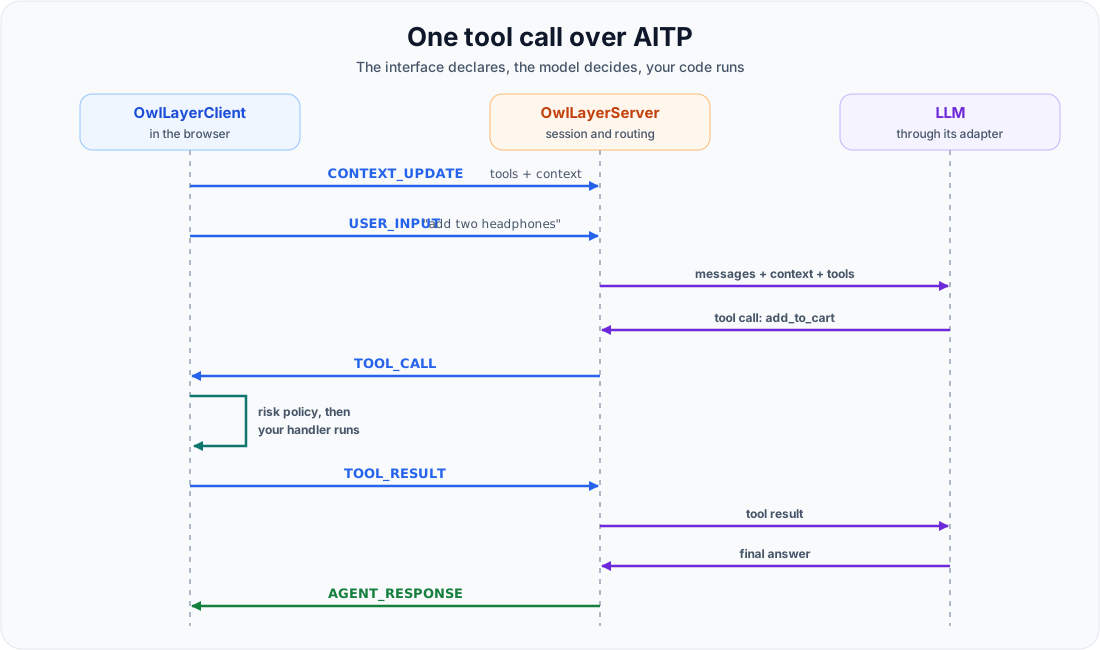
When the user sends input (either text or voice), the server feeds the input, current context, and active tools into the LLM. If the LLM requests a tool call, the server routes it to the client, awaits the results, and streams back the final response.
3. Human Approval
When the client executes a TOOL_CALL for a high or critical tool, the HITL policy suspends it before the handler runs. The client sends APPROVAL_REQUEST to the server, which extends the call timeout while the user decides. After the decision, the client sends APPROVAL_RESPONSE with approved and, if the tool ran, its result. A refusal is never turned into a success.
For a risky server-side tool, the direction is reversed: the server sends APPROVAL_REQUEST to the client, the user decides in the interface, and the client answers with APPROVAL_RESPONSE. The server runs the tool only if it was approved.
Message Types Reference
The protocol defines 14 message types.
| Message | Direction | Role |
|---|---|---|
HANDSHAKE_INIT | Client → Server | Announces the API key, SDK version and protocol version at socket open |
HANDSHAKE_ACK | Server → Client | Confirms the session and the negotiated capabilities |
CONTEXT_UPDATE | Client → Server | Synchronizes URL, title, context, and active tools |
USER_INPUT | Client → Server | Sends a user text message or a complete audio message |
TOOL_CALL | Server → Client | Requests execution of an interface tool |
TOOL_RESULT | Client → Server | Returns success, error, or pending_approval |
APPROVAL_REQUEST | Client ↔ Server | Describes an action waiting for the user's approval |
APPROVAL_RESPONSE | Client → Server | Returns the user's decision and, for an interface tool, its result |
AGENT_RESPONSE | Server → Client | Streams the agent's text response |
AUDIO_STREAM | Client ↔ Server | Streams live audio chunks (microphone up, agent voice down) |
VOICE_INPUT_END | Client → Server | Signals the end of the user's speech (user_stop, vad, or timeout) |
VOICE_INTERRUPT | Client → Server | Signals that the user interrupted the agent (barge-in) |
VOICE_STATE_EVENT | Server → Client | Signals turn_complete, interrupted, or waiting_for_input |
SYSTEM_EVENT | Server → Client | Signals errors, waiting, approvals, and runtime control |
1. HANDSHAKE_INIT (Client → Server)
Sent by the client to initialize the session parameters.
{
  "type": "HANDSHAKE_INIT",
  "payload": {
    "apiKey": "pk_live_your_public_api_key",
    "userAgent": "Mozilla/5.0 ...",
    "viewport": "1440x900",
    "sdkVersion": "0.4.0",
    "protocolVersion": "1.0.0"
  }
}
2. HANDSHAKE_ACK (Server → Client)
Sent by the server to confirm connection validation.
{
  "type": "HANDSHAKE_ACK",
  "payload": {
    "sessionId": "ses_9e210bbf",
    "serverVersion": "0.4.0",
    "protocolVersion": "1.0.0",
    "capabilities": ["text", "audio", "tools"],
    "maxActiveTools": 30
  }
}
maxActiveTools (optional) is the maximum number of active tools of the session, set on the server with the maxActiveTools option. The client applies it to its registry; without it, the client uses 30. Older clients ignore the field.
3. CONTEXT_UPDATE (Client → Server)
Sent dynamically whenever page state, URL, or tools registration changes.
{
  "type": "CONTEXT_UPDATE",
  "payload": {
    "url": "/products/headphones",
    "title": "Pro Headphones - Store",
    "activeTools": [
      {
        "name": "add_to_cart",
        "description": "Add the currently viewed product to the shopping cart",
        "parameters": {
          "type": "OBJECT",
          "properties": {
            "quantity": { "type": "NUMBER", "description": "Quantity to add" }
          },
          "required": ["quantity"]
        },
        "risk": "low"
      }
    ],
    "context": {
      "page": "product_detail",
      "productId": "pro-headphones",
      "price": 149.99
    }
  }
}
4. USER_INPUT (Client → Server)
Carries a user message, either as text or as a complete base64 audio message (modality: "audio" with a mimeType). Live audio uses AUDIO_STREAM instead.
{
  "type": "USER_INPUT",
  "payload": {
    "modality": "text",
    "content": "Add 2 to my cart"
  }
}
5. TOOL_CALL (Server → Client)
The server requests the client to invoke a local front-end tool.
{
  "type": "TOOL_CALL",
  "payload": {
    "callId": "tc_4892c90",
    "name": "add_to_cart",
    "args": {
      "quantity": 2
    }
  }
}
6. TOOL_RESULT (Client → Server)
The client returns the execution status of a tool.
{
  "type": "TOOL_RESULT",
  "payload": {
    "callId": "tc_4892c90",
    "status": "success",
    "result": {
      "added": true,
      "cartTotal": 299.98
    }
  }
}
status is success, error (with an error message), or pending_approval when the tool waits for the user.
7. APPROVAL_REQUEST (Client ↔ Server)
Describes an action waiting for the user's approval: sent by the client for an interface tool, or by the server for a server-side tool.
{
  "type": "APPROVAL_REQUEST",
  "payload": {
    "callId": "tc_7a1d220",
    "toolName": "process_payment",
    "risk": "critical",
    "args": { "amount": 299.98 },
    "message": "Pay 299.98 USD with the saved card?"
  }
}
8. APPROVAL_RESPONSE (Client → Server)
Returns the user's decision. For an approved interface tool, it also carries the result or the error of the handler.
{
  "type": "APPROVAL_RESPONSE",
  "payload": {
    "callId": "tc_7a1d220",
    "approved": true,
    "result": { "paid": true }
  }
}
9. AGENT_RESPONSE (Server → Client)
Streams the text chunk response from the LLM back to the client.
{
  "type": "AGENT_RESPONSE",
  "payload": {
    "chunk": "I have added two Pro Headphones to your cart.",
    "done": true
  }
}
10. AUDIO_STREAM (Client ↔ Server)
Streams live audio chunks: the microphone from the client in realtime voice mode, and the agent's voice from the server.
{
  "type": "AUDIO_STREAM",
  "payload": {
    "data": "UklGRiQAAABXQVZF...",
    "mimeType": "audio/pcm;rate=24000"
  }
}
11. VOICE_INPUT_END (Client → Server)
Signals that the user finished speaking. reason is user_stop (button), vad (voice activity detection), or timeout.
{
  "type": "VOICE_INPUT_END",
  "payload": { "reason": "vad" }
}
12. VOICE_INTERRUPT (Client → Server)
Signals that the user started speaking while the agent was talking (barge-in).
{
  "type": "VOICE_INTERRUPT",
  "payload": { "reason": "barge_in" }
}
13. VOICE_STATE_EVENT (Server → Client)
Signals a change of the voice turn: turn_complete, interrupted, or waiting_for_input.
{
  "type": "VOICE_STATE_EVENT",
  "payload": { "event": "turn_complete" }
}
14. SYSTEM_EVENT (Server → Client)
Reports errors, waiting states, approvals, and runtime control. kind is one of error, waiting, approval_required, tools_effective, transcript, reload, redirect, or disconnect.
{
  "type": "SYSTEM_EVENT",
  "payload": {
    "kind": "error",
    "message": "API key usage limit exceeded."
  }
}
In voice mode, transcript carries what the user said and what the agent is saying, fragment by fragment. OwlLayerClient emits it as the transcript.delta event, and the built-in widgets show it in the conversation:
{
  "type": "SYSTEM_EVENT",
  "payload": {
    "kind": "transcript",
    "data": { "role": "agent", "text": "Your headphones are in the cart." }
  }
}
Connection Troubleshooting: Handshake Timeout
To prevent the client application from stalling in a perpetual connecting state when a WebSocket transport opens but the server fails to respond, OwlLayerClient implements an automatic Handshake Timeout.
Lifecycle and Mechanics
- Immediately upon opening the network channel (WebSocket or WebRTC DataChannel), the client sends a
HANDSHAKE_INITpacket and starts an internal timer set to5000ms(HANDSHAKE_TIMEOUT_MS). - If a valid
HANDSHAKE_ACKmessage is received from the server, the timer is cleared, and the client transitions to theconnectedstate. - If the timer expires before receiving the
HANDSHAKE_ACKacknowledgment:- The connection state transitions to
error. - A system event error notification is emitted.
- The active WebSocket/DataChannel transport is closed (
close(4000, 'Handshake timeout')) to free up system resources. - The client triggers the configured reconnection delay strategy.
- The connection state transitions to