
Core Concepts
OwlLayer AI is an Agentic UI SDK. It does not replace your interface or generate a new UI on top of your product. It lets an AI agent act within your existing interface through explicit actions, observable context, and guardrails.
The model rests on five concepts: the Neural-DOM Binding, tools, the Shadow Context, policy-controlled execution (HITL), and the AITP protocol.
Agentic UI
An agentic interface is one that an agent can drive through explicit entry points.
The agent does not freely manipulate the DOM. It does not guess which buttons to click. It receives a structured context and a list of tools declared by the application, then acts only through those tools.
This distinguishes OwlLayer from two related approaches:
- A classic chatbot, which mostly responds with text.
- A Generative UI, which fabricates a new interface rather than driving the existing one.
In OwlLayer, the application remains the owner of its business logic. The agent only calls actions the product explicitly chooses to expose.
Neural-DOM Binding
The Neural-DOM Binding is the central architectural concept of OwlLayer. It describes the controlled link between an existing interface, the context that interface agrees to share, and the reasoning of an AI agent.
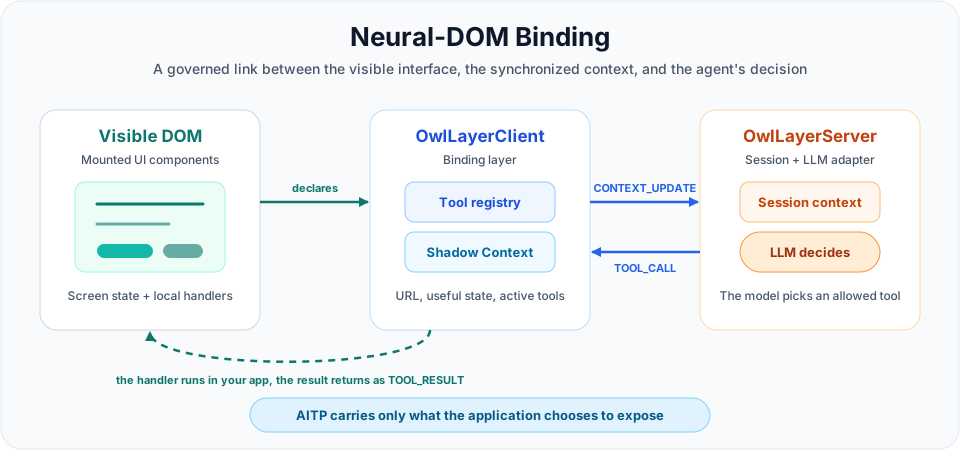
The model does not receive free access to the DOM. It receives a contract: a structured Shadow Context, a list of active tools, and an exchange protocol. When it wants to act, it does not click directly in the interface; it requests execution of a tool declared by the application.
The principle reads in three layers:
| Layer | Role | OwlLayer Rule |
|---|---|---|
| Visible DOM | What the user sees and manipulates | The agent does not freely browse it |
| Shadow Context | Useful representation of the screen, visible data, and mounted tools | Only this context is synchronized with the server |
| Agentic Session | Server runtime, LLM adapter, and tool call decisions | The LLM only sees tools present in the current session |
The word Binding matters: the link is not static. When a page, product card, modal, or form appears, its tools can enter the Shadow Context. When that UI disappears, its tools must be removed and the server must receive a new CONTEXT_UPDATE. This prevents out-of-context actions.
The word Neural designates the decision-making part: the model reasons on the authorized context, then optionally chooses a tool. But execution stays in application code, with schemas, permissions, HITL validations, and handlers defined by the product.
Tools
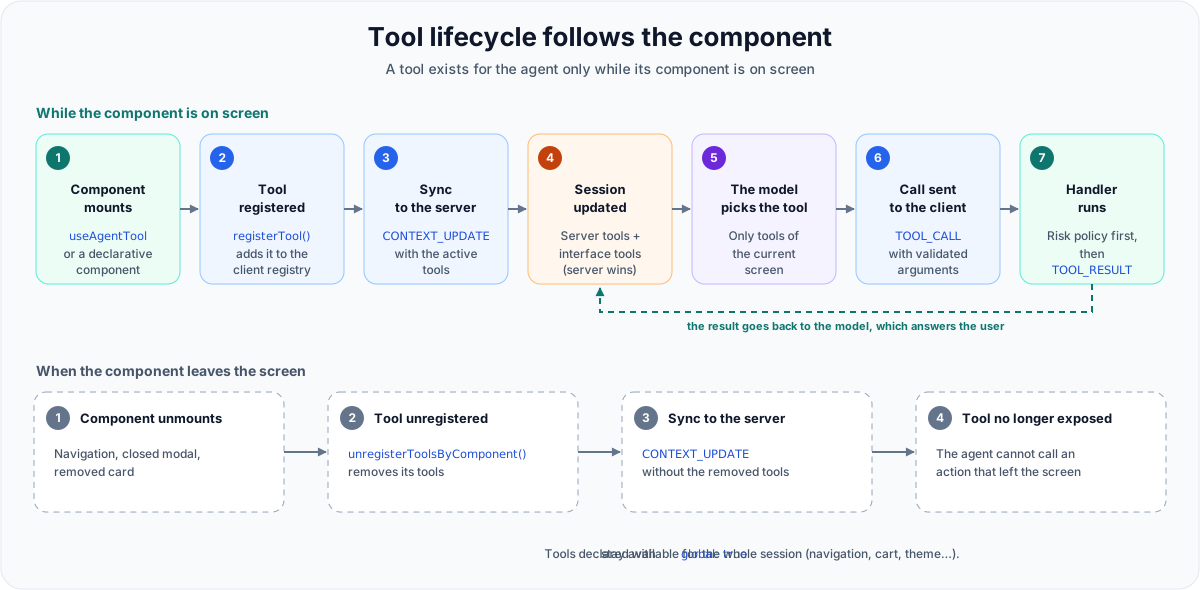
A tool is a business action the agent is allowed to trigger: a name, a description the model reads, an input schema, a risk level, and a handler in the application code. The binding is carried by tools, and three parts of the runtime manage them.
| Part | In the runtime | What it does |
|---|---|---|
| Registration | registerTool() in OwlLayerClient, called by useAgentTool, the declarative components, OwlLayer.registerTool(), and data-owllayer-tool auto-discovery | Adds the tool to the client registry (ToolRegistry, the class the server also uses for each session) and schedules a CONTEXT_UPDATE, so the server receives the new list. Above the tool limit (30 by default, set by the server), the tool is refused and the refusal is reported. |
| Unregistration | unregisterTool(name) and unregisterToolsByComponent(componentId) | Removes one tool, or every tool of a component when it unmounts. Tools declared with global: true stay for the whole session. |
| Execution | OwlLayerClient, on each TOOL_CALL | Finds the tool, validates the arguments with its schema, evaluates its risk with the HITL policy, waits for the Promise returned by the handler, then sends TOOL_RESULT. An unknown tool or invalid arguments return an error result, without asking for approval. |
When a handler navigates to another page, the executor waits until the new page has registered its tools before sending the result. The model then continues with the tools of the new screen instead of the tools of the page it left.
In voice mode, OpenAI Realtime, the Deepgram Voice Agent and the streaming pipeline update the tools of the running session. Gemini Live reads its tools only when the connection opens. With the default model, gemini-2.5-flash-native-audio-preview-12-2025, GoogleLiveAdapter resumes the session with the new tools at the end of the current turn: Google keeps the conversation, and a tool of the new page is available from the next spoken turn. Gemini 3.x Live models keep the tools of the opening: see Voice models and tool updates.
On the server, ToolRouter dispatches each call: server-side tools run on the server, and interface tools are sent to the client as TOOL_CALL and awaited. When a server tool and an interface tool share a name, the server tool wins, and server.blockTool(name) blocks a tool even if a client declares it.
The Tools Guide covers how to write good tools, the execution contract, and the anti-patterns.
OwlLayerClient
OwlLayerClient is the front-end core of OwlLayer. The framework SDKs add ergonomics suited to their environment, but they share the same runtime.
| SDK | Primary Integration | Runtime |
|---|---|---|
| React | OwlLayerProvider, hooks, components | OwlLayerClient |
| Vue | plugin, composables, components | OwlLayerClient |
| Svelte | stores, actions, components | OwlLayerClient |
| Angular | provider, injection, signals, directives | OwlLayerClient |
| Browser | Direct JavaScript API, HTML auto-discovery | OwlLayerClient |
What the client shares across all frameworks:
- WebSocket AITP connection
- Local tool registry
- Context synchronization
- Tool call execution
- Tool result emission
- Session state and runtime events
React, Vue, Svelte, Angular, and Browser change how tools are declared. They do not change the protocol.
AITP
AITP stands for Agent-to-Interface Transfer Protocol.
It is the JSON-over-WebSocket protocol that connects OwlLayerClient to OwlLayerServer.
| Message | Direction | Role |
|---|---|---|
HANDSHAKE_INIT | Client → Server | Announces the API key, SDK version and protocol version at socket open |
HANDSHAKE_ACK | Server → Client | Confirms the session and the negotiated capabilities |
CONTEXT_UPDATE | Client → Server | Synchronizes URL, title, context, and active tools |
USER_INPUT | Client → Server | Sends a user text message or a complete audio message |
TOOL_CALL | Server → Client | Requests execution of an interface tool |
TOOL_RESULT | Client → Server | Returns success, error, or pending_approval |
APPROVAL_REQUEST | Client ↔ Server | Describes an action waiting for the user's approval |
APPROVAL_RESPONSE | Client → Server | Returns the user's decision and, for an interface tool, its result |
AGENT_RESPONSE | Server → Client | Streams the agent's text response |
AUDIO_STREAM | Client ↔ Server | Streams live audio chunks (microphone up, agent voice down) |
VOICE_INPUT_END | Client → Server | Signals the end of the user's speech (user_stop, vad, or timeout) |
VOICE_INTERRUPT | Client → Server | Signals that the user interrupted the agent (barge-in) |
VOICE_STATE_EVENT | Server → Client | Signals turn_complete, interrupted, or waiting_for_input |
SYSTEM_EVENT | Server → Client | Signals errors, waiting, approvals, and runtime control |
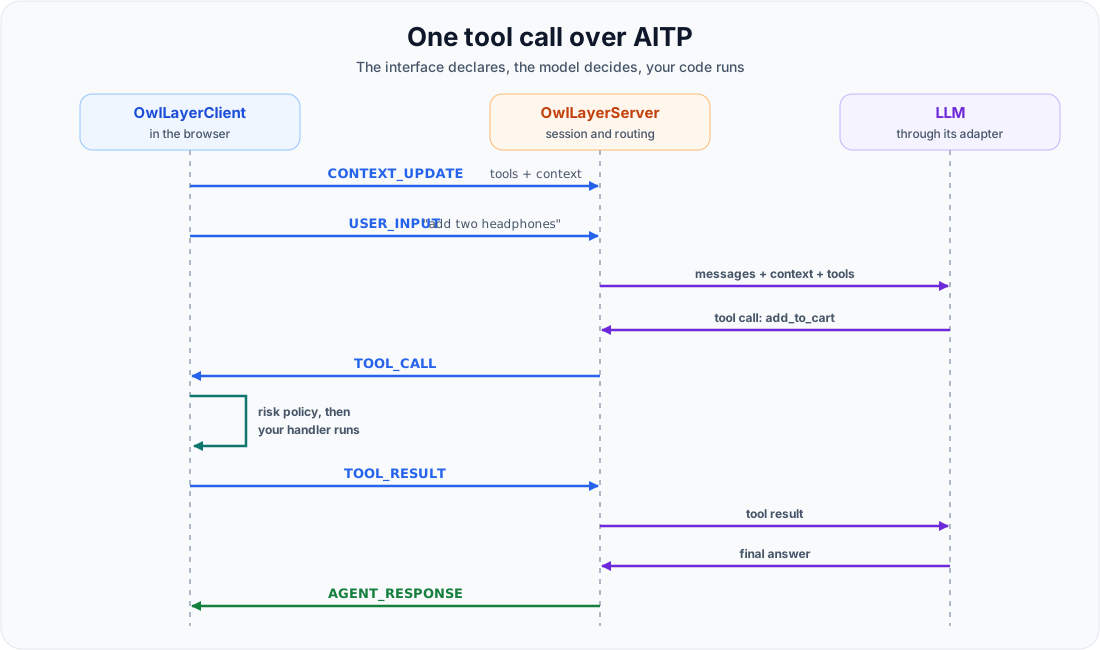
The protocol defines these 14 message types. At the handshake, the server compares the protocol version strictly with its own and closes the connection if they differ. The server can only call tools known in the current session context. The AITP Protocol Spec details each payload.
Shadow Context
The Shadow Context is the lightweight representation of the interface's useful state.
It does not copy the entire DOM. It contains only the information the application chooses to expose:
- Current URL and title
- Active page or view
- Visible entity
- Current selection
- Active filters
- Cart, folder, workflow step, or other useful business data
- List of active tools
Passive context helps the model understand the situation. It does not create actions. Actions are carried by tools.
The application publishes it where the state lives. The model reads it as text, so explicit sentences are more useful than raw variables, and the context can also carry instructions the developer wants the agent to follow on this screen.
| SDK | API |
|---|---|
| React | useAgentContext() |
| Vue | useAgentContext() |
| Svelte | use:agentContext action |
| Angular | registerContext() or OwlLayerAngularService.updateContext() |
| Browser | OwlLayer.updateContext() merges, OwlLayer.setContext() replaces, and data-owllayer-context adds context to an element marked as a tool |
HITL (Human-in-the-Loop)
OwlLayer classifies tools by risk level:
| Risk | Expected Behavior | Example |
|---|---|---|
none | Direct execution | search_products |
low | Direct execution with optional notification | add_to_cart |
high | User confirmation required | clear_cart |
critical | Reinforced user confirmation required | process_payment |
Risk should reflect the real user impact, not the technical complexity of the handler.
High and critical tools cannot execute until the user physically clicks "Approve". In the React and browser SDKs, the confirmation interface is rendered inside a closed Shadow DOM, so page scripts cannot reach it or click the approval buttons programmatically.